Chapter 5: Tera Calculation 3_UtilitySoft
Section 1: Truck Trajectory Calculation
Easily simulate the turning trajectory and required turning width of trucks based on the calculation formulas of the "Style of Right-Angle Turning Trajectory Diagrams for Semi-Trailers and Full Trailers" (JASO Z 006-92) by the Society of Automotive Engineers of Japan.
It supports adjusting the vehicle pitch to fit the loading dock of the distribution center, as well as changing the center of rotation through backing up and steering adjustments. You can also add vehicle types via Excel (Truck Dimensions.xlsx), supporting trajectory calculations aligned with actual operations.
This tool is a utility designed to intuitively perform truck turning trajectory calculations, which are indispensable for designing distribution centers and warehouses.
- Free Customization of Vehicle Types: In addition to the default vehicle types, you can add or modify arbitrary vehicle sizes by editing a dedicated Excel file (Truck Dimensions.xlsx).
- Practical Parameter Adjustment: By adjusting the "vehicle pitch" and "straight-ahead numerical values" according to the conditions of the distribution center's loading dock, you can derive the optimal required turning width for the site.
- Considering Operational Flexibility: When there is a large difference in vehicle clearance, simulation that accounts for changes in the center of rotation (Base Point 2) through backing up and steering adjustments is possible.
- Supporting Safety Design: Considerations for the surrounding environment, such as the direction of front clearance, green belts, and pedestrian walkways, can also be included in the review factors.
The calculation of inter-vehicle clearance utilizes geometric calculations of a right triangle (with P1 and P4 as the base, and P1 and P3 as the hypotenuse), accurately determining the height from the angles. This enables highly accurate design based on theory.
Selectable Vehicle Types
Modifying or adding vehicle types is done via "Tera Calculation Data\Truck Trajectory Calculation\Truck Dimensions.xlsx".
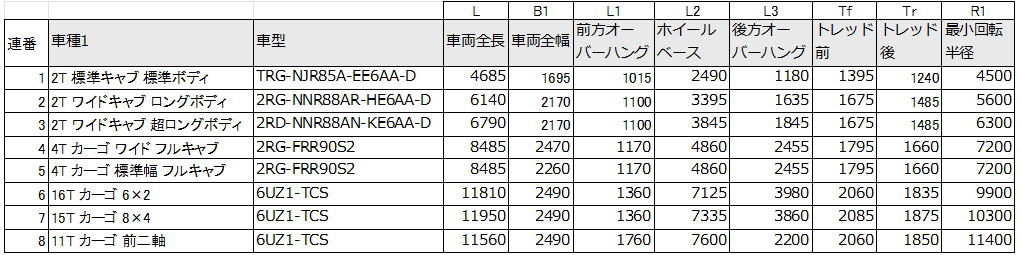
On the calculation screen, select the vehicle type and press the Calculate Start button.
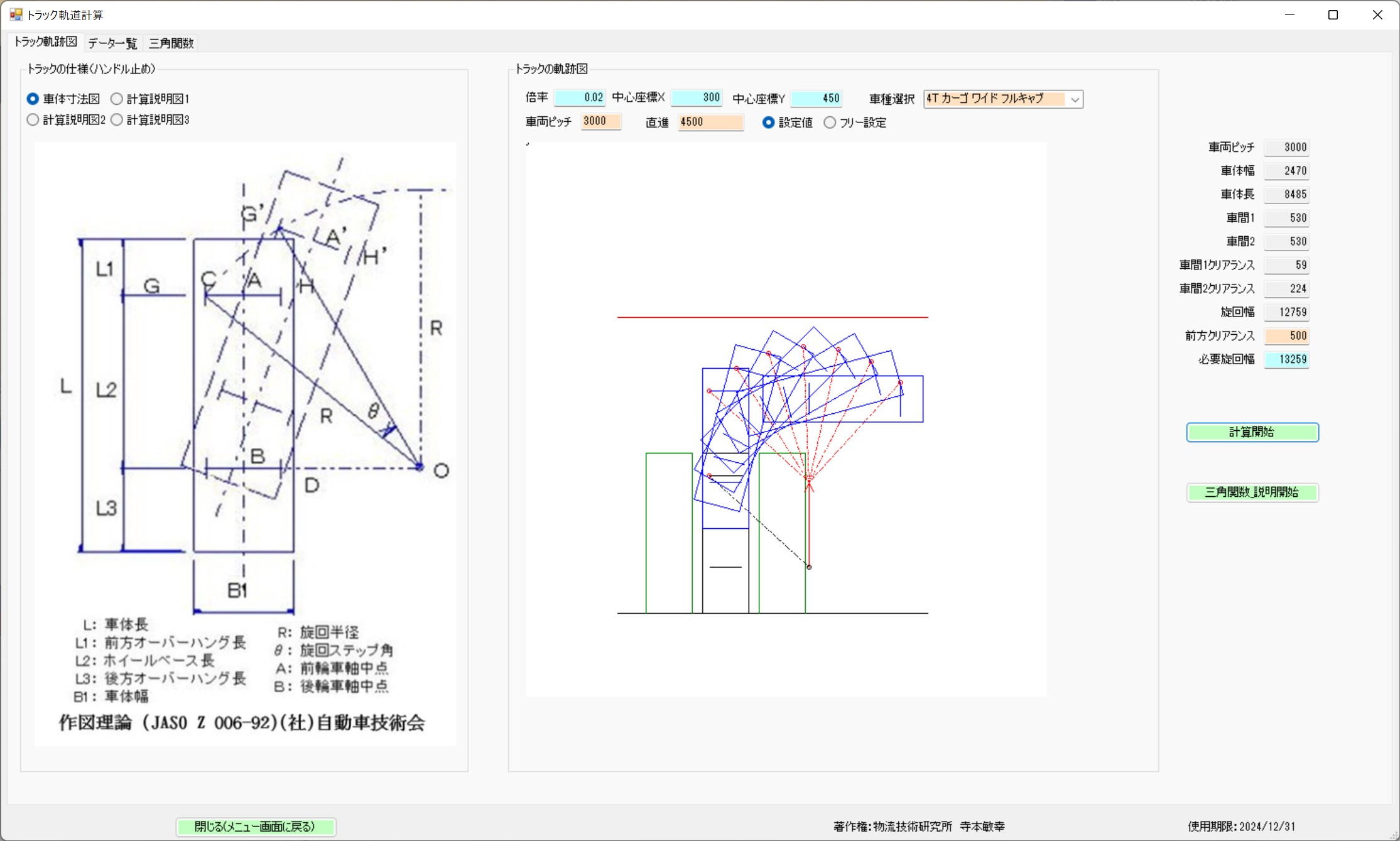
Check the calculated numerical values, adjust the vehicle pitch and straight-ahead numerical values, and find the required turning width.
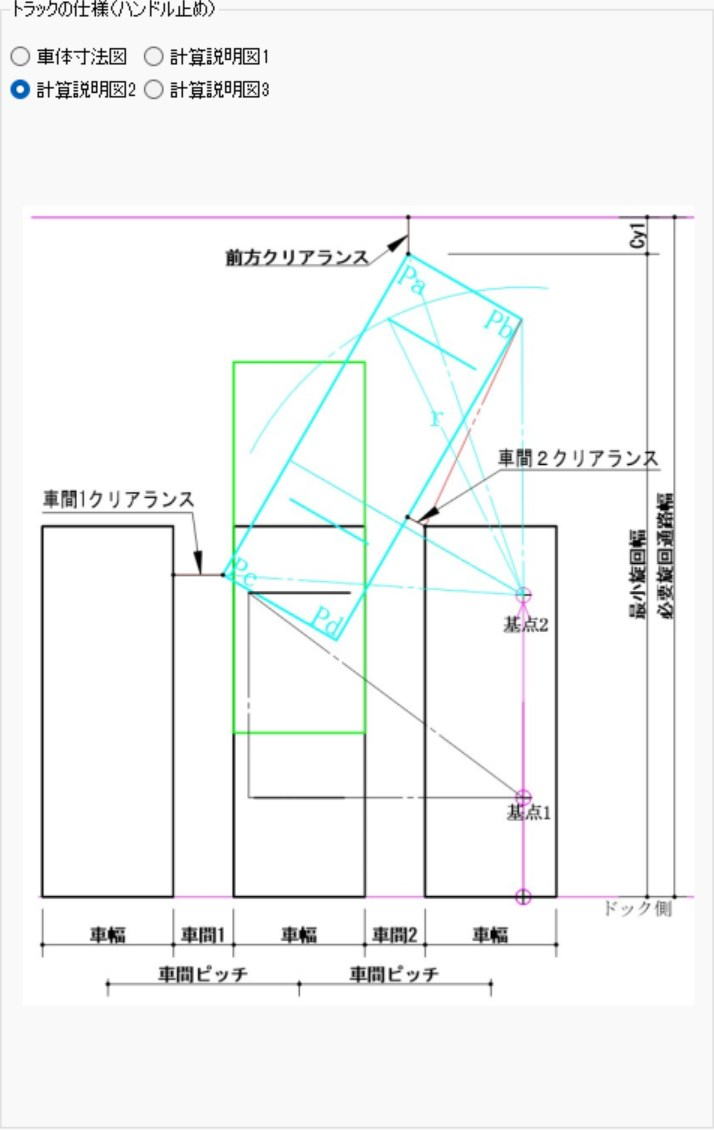
The vehicle pitch is determined by the distribution center's loading dock.
When the difference between Clearance 1 and Clearance 2 is large, consider that the center of rotation (Base Point 2) can be altered by steering the vehicle back and forth.
Take into consideration that the direction of the front clearance involves other factors such as green belts, parking lots, and pedestrian walkways.
Calculations for trailers are currently under development.
How to Determine Clearance 2
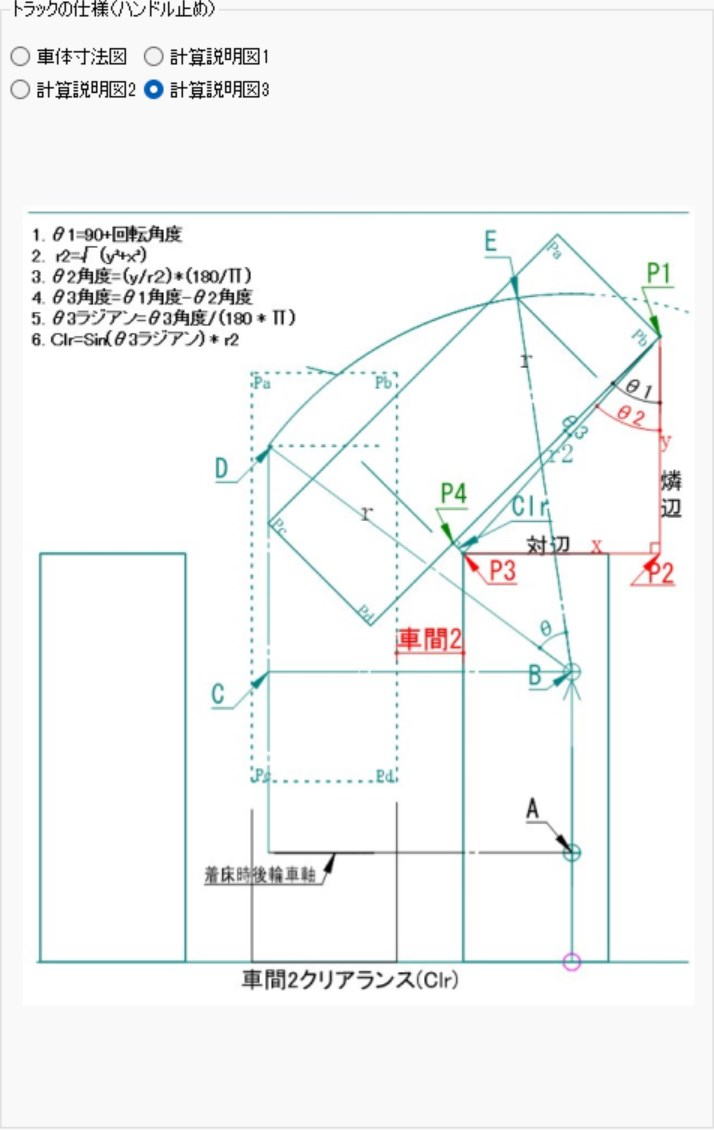
Using a right triangle with P1 and P4 as the base, P1 and P3 as the hypotenuse, and the angles of P4, P1, and P3, determine the height of P4 and P3.
Refer to calculation steps 1-6 on the left.
Section 2: Piece Shipping Container Calculation
This function simulates the number of containers (such as collapsible containers) required for piece shipping (piece/small-lot shipping) based on daily shipping data.
The calculation is performed in the following steps, considering not just simple total volume, but also delivery efficiency and storage space.
Main Calculation Steps
- Setting Conditions: Select the target "Shipping Date", specify the "Container Model" to be used, and input the "Fill Rate" (how much to pack into the container).
- Data Extraction: The system automatically extracts destination data designated for piece shipping containers from the "Shipping Category".
- Volume Aggregation and Calculation: It aggregates the volume of the destination and calculates the following
numerical values.
- Required Number of Containers: The total number of boxes needed.
- Number of Loaded Pallets (PL): The number of pallets when the containers are loaded onto them.
- Empty Container Storage PL Count: How many pallets are needed when storing the empty containers folded up after use.
Operational Points
For efficient logistics management, the following practical features are provided.
- Limitation of Applicable Scope: Because piece shipping containers need to be collected, the targets are limited to destinations using in-house fleets or dedicated fleets.
- Diverse Calculation Logic: It simultaneously displays numerical values for "Simple Aggregation", "Rounding Down", "Rounding Off", and "Rounding Up".
- Method of Determining the Required Quantity: In practice, it is common to adopt the result of the "Rounding Up Calculation" for peak shipping days, and then further consider the collection cycle (turnover rate) from destinations to determine the final total number of containers to possess.
Calculation of Required Piece Shipping Containers from Shipping Data
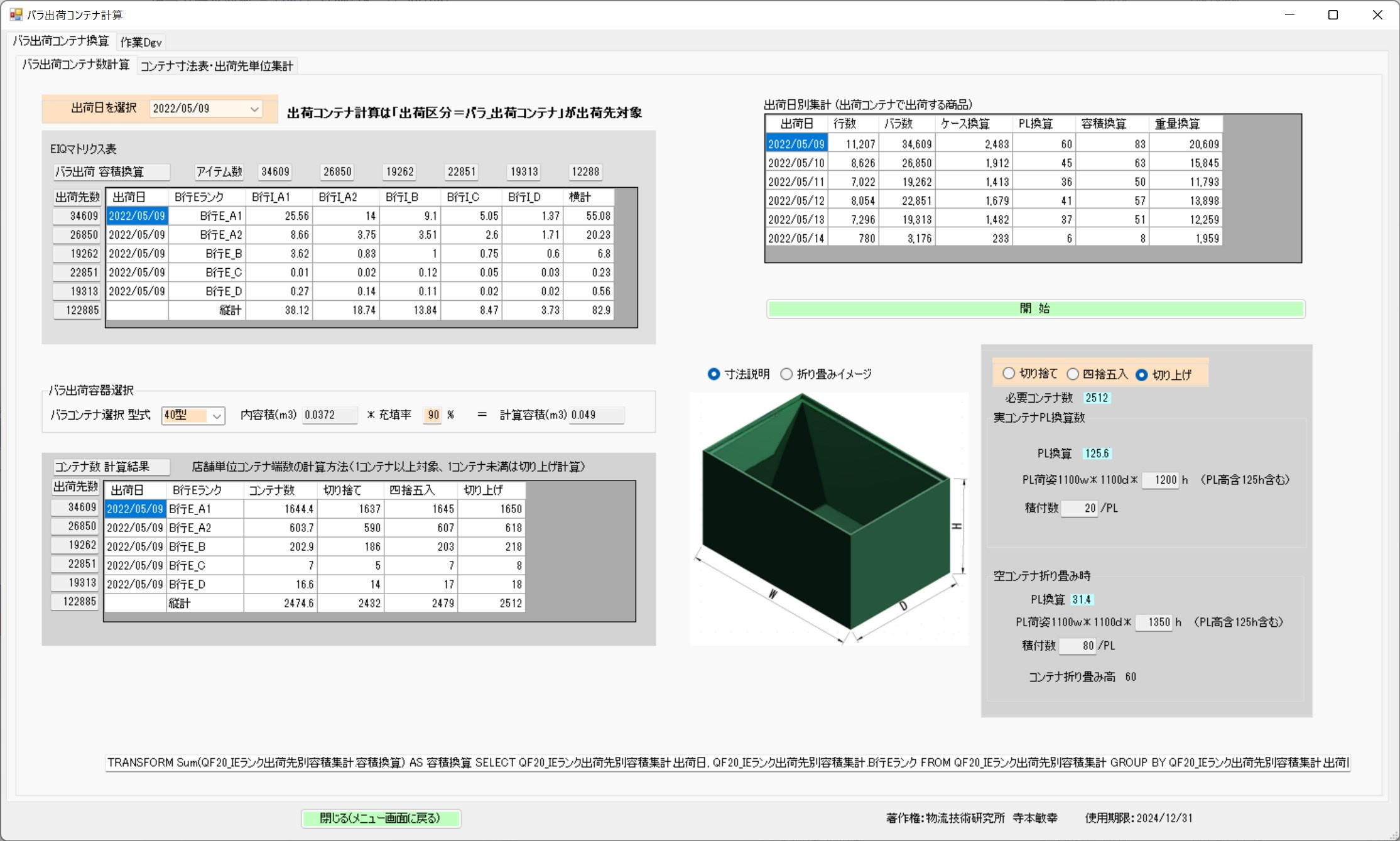
Destinations using piece shipping containers are limited to in-house fleets and dedicated fleets capable of collecting empty containers.
1. Select the target shipping date and container model, and input the fill rate.
2. By pressing the Start button.
3. The software extracts destinations designated for piece shipping containers from the "Shipping Category".
4. From the volume aggregation of the destinations, the required number of containers and the number of PLs when loaded are calculated.
5. It also calculates the number of PLs when empty containers are folded and stored on PLs.
The calculation displays simple aggregation, rounding down, rounding off, and rounding up calculations.
Usually, the rounding up calculation for peak shipping days is adopted, and the required number of containers is calculated by factoring in the collection cycle from the destinations.
Section 3: Forklift Loading Aisle Width
Overview of Forklift Loading Aisle Width Calculation
This function calculates the minimum aisle width required for a forklift loaded with cargo to safely turn and operate during warehouse layout design.
Basic Operation
- Selecting Vehicle Type and Model: By selecting the model and type of the forklift to be used and pressing the "Recalculate" button, the aisle width is instantly calculated.
- Compatibility Among Manufacturers: As long as the model and vehicle type are the same across different manufacturers, the calculated loading aisle width will be almost identical.
Calculation Logic for Loading Aisle Width
The loading aisle width $R$ is defined by the following formula based on the vehicle's characteristics and the size of the cargo.
- $R1$: The factor related to the vehicle's turning radius.
- $R2$: The factor for outward overhang, including the cargo.
- $C$ (Clearance): An allowance width for safety, typically set at 100mm.
Differences in Turning Base Points by Vehicle Type
Because the position of the pivot axis differs depending on the structure of the forklift, these must be considered in the calculations.
- 3-Wheel Type: The turning base point is at the center of the front axle.
- 4-Wheel Type: The turning base point is on the outside of the front axle.
Benefits of Utilization
- Highly Accurate Layout Design: Because simulation based on dimensional data of a specific manufacturer (forklift dimensions) is possible, aisle designs without wasted space can be achieved.
- Ensuring Safety: Confirming numerical values that include appropriate clearance reduces the risk of collision accidents on-site.
Calculation Screen
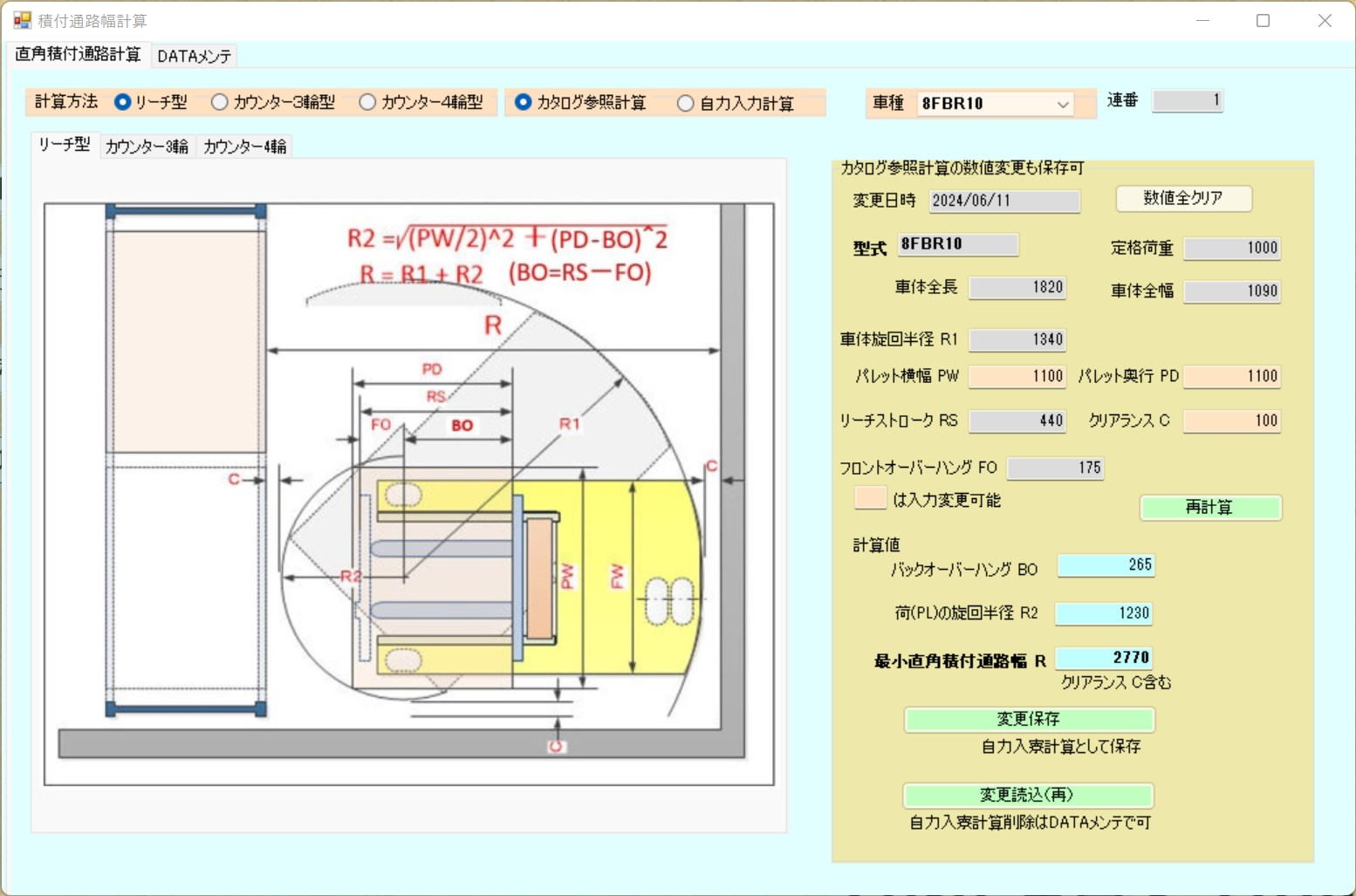
Select the forklift model and type, then press the Recalculate button.
If the model and vehicle type are the same across manufacturers, the loading aisle width is almost the same.
Loading Calculation Formulas
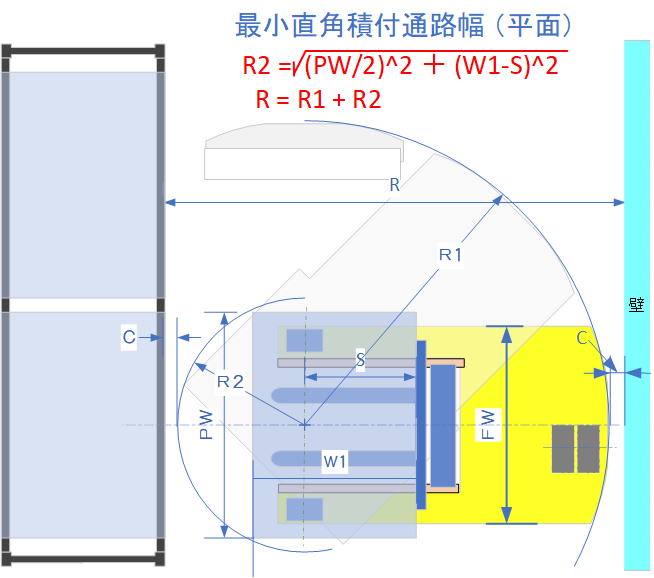
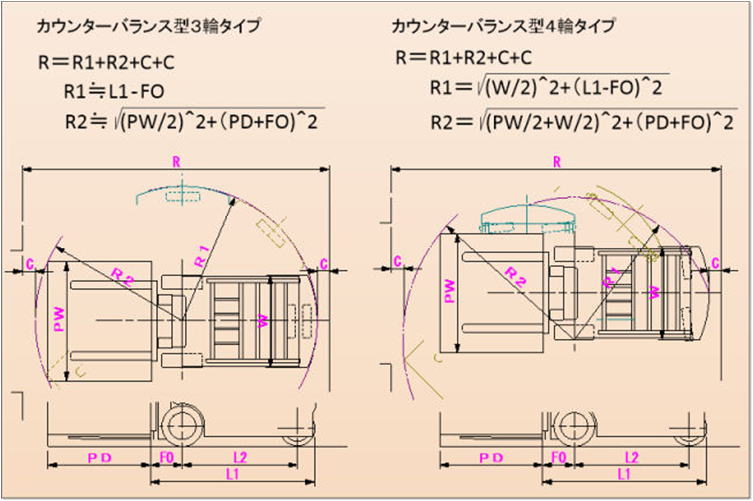
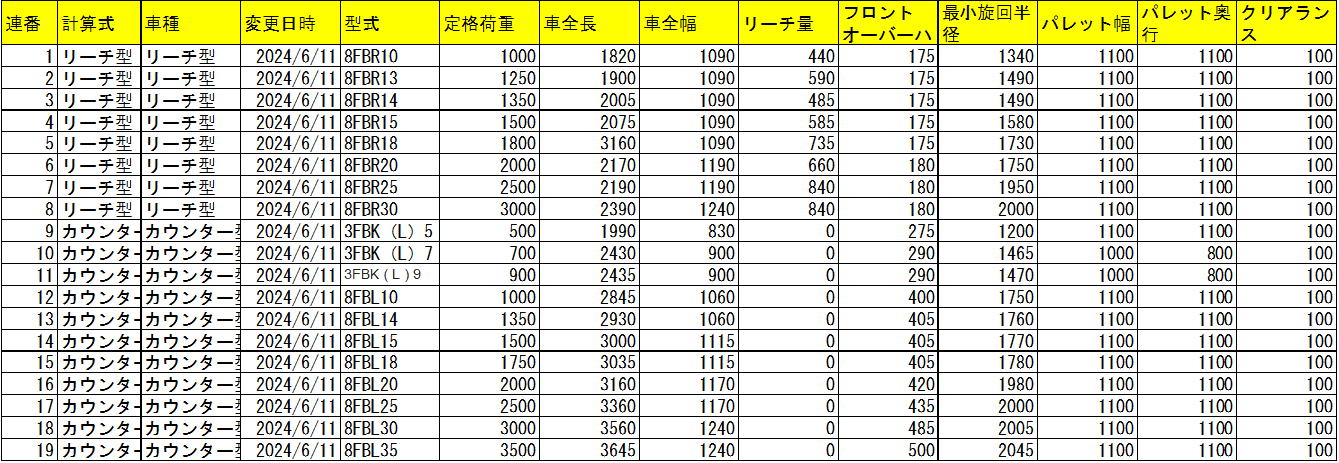
Forklift Dimensions of a Certain Manufacturer
The 3-wheel type forklift has its turning base point at the center of the front axle, and the 4-wheel type forklift has its turning base point on the outside of the front axle.
For both types, the loading aisle width R is R = R1 + R2 + C.
C (Clearance is usually 100mm)
Section 4: PL Loading and Storage Scale
Overview of PL Loading and Storage Scale Calculation
This function is a simulation tool that calculates the loading module onto a pallet (PL) based on the case dimensions and weight for each product, and computes the required total number of pallets from the inventory count.
Main Calculation and Determination Functions
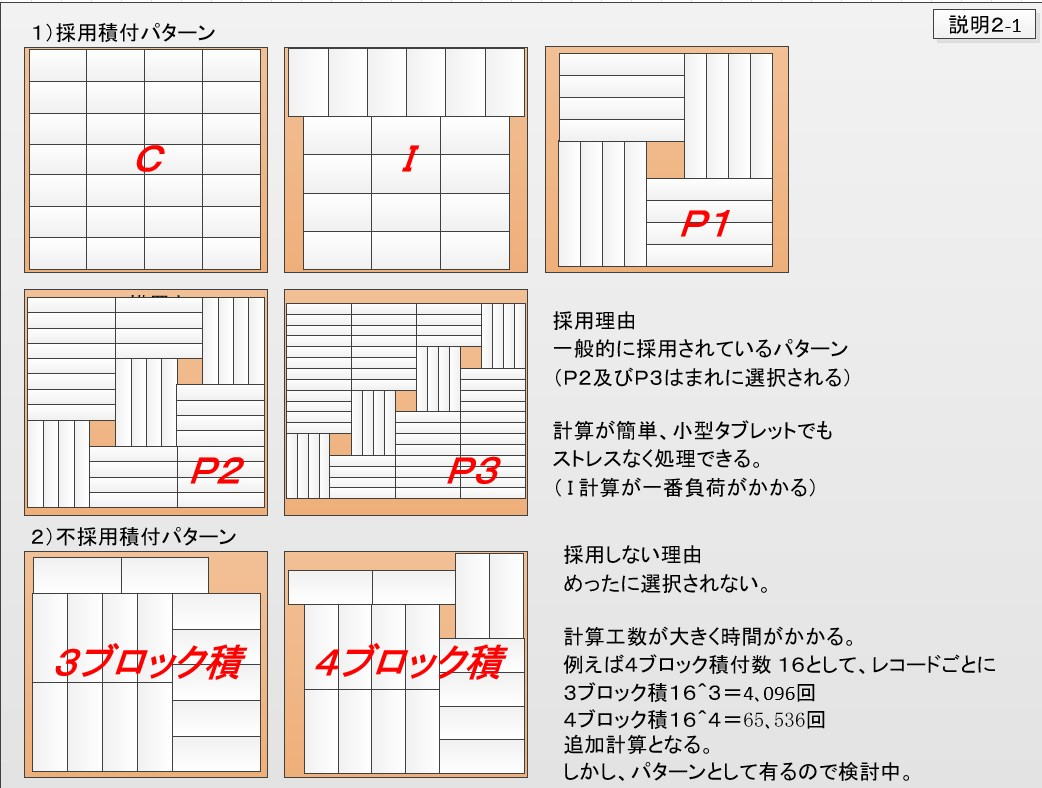
- Automatic Calculation of Loading Module: Automatically calculates the "planar storage count" from the case's planar dimensions, and the "number of stacked tiers" from the height.
- Automatic Discrimination of Unloadable Items: If a case's dimensions or weight are not suitable for pallet loading, the system automatically discriminates and displays it as "Unloadable".
- Real-time Display: Clicking a record on the screen interactively displays a planar diagram of the load.
- Specification of Pallet Specifications: Calculations can be performed by specifying arbitrary pallet dimensions and packaging configurations.
Optimization and Aggregation of Storage Efficiency
Simulation results can be output to Excel, allowing for advanced estimation of storage scale that takes mixed loading (placing multiple products on a single pallet) into account.
Aggregation Logic for Mixed Pallets
Based on inventory volume, the number of pallets is counted according to the following criteria to calculate a storage scale close to actual practice.
| Inventory Volume (PL Conversion) | Computational Treatment |
|---|---|
| 0.5 PL or more | Calculated as rounded up single-item load (occupies 1 pallet) |
| 0.33 PL to less than 0.5 PL | Calculated as 2 mixed load (2 items per 1 pallet) |
| 0.25 PL to less than 0.33 PL | Calculated as 3 mixed load (3 items per 1 pallet) |
| Less than 0.25 PL | Calculated as 4 mixed load (4 items per 1 pallet) |
Benefits of Introduction and Utilization
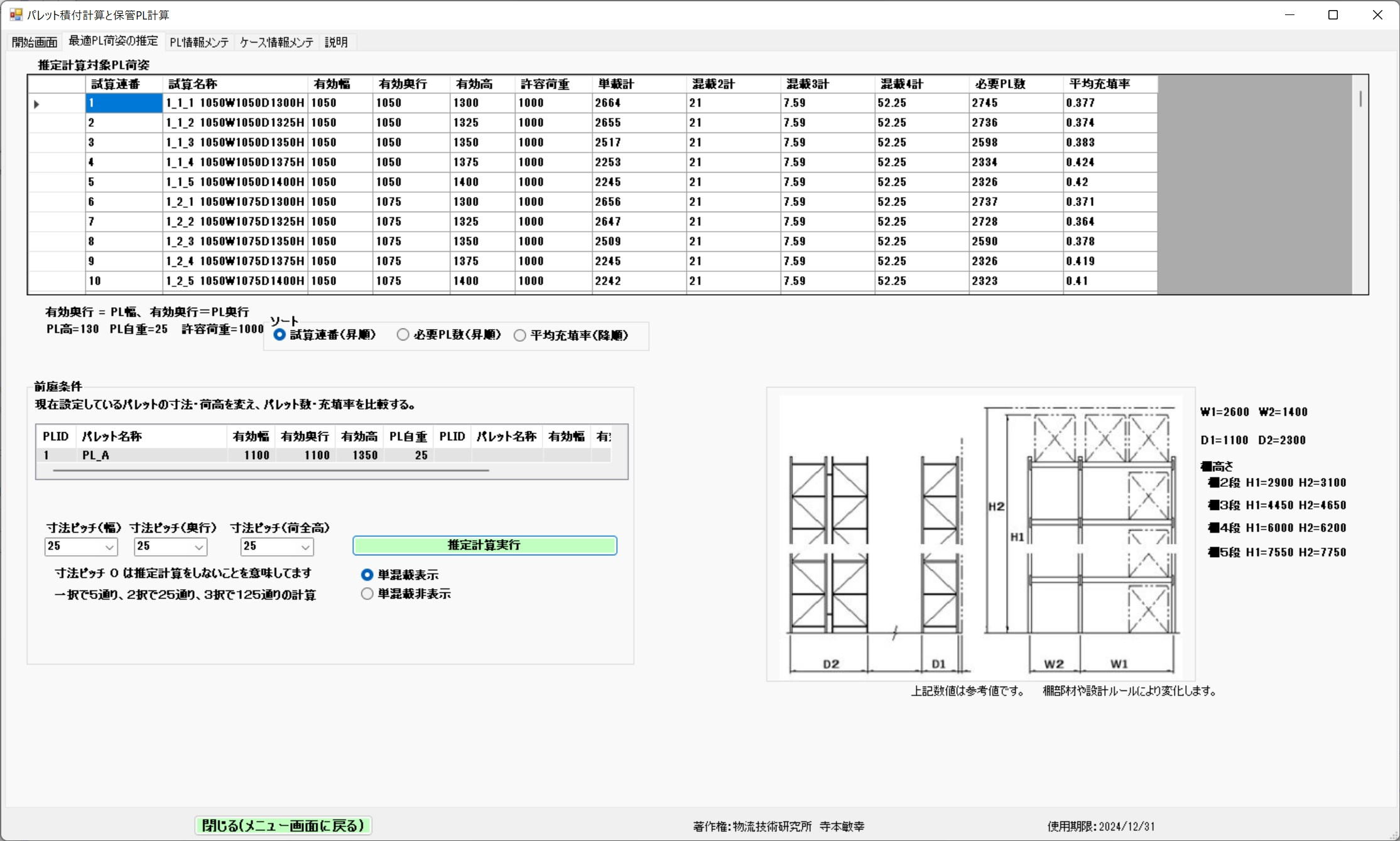
- Estimation of Optimal PL Configuration: You can compare various pallet dimensions and estimate in advance how storage efficiency and required storage area will change.
- Improvement of Storage Planning Accuracy: Because it calculates the logical number of required PLs from inventory count and loaded quantities, it can be used as a basis for warehouse capacity planning.
* Note
This program is an independent utility software that is not directly linked
to shipping data or the main "Tera Calculation" system.
Calculation Screen
Calculates the PL loading module from case dimensions by product, and calculates the required number of PLs from inventory count and PL loaded quantity.
Note: This software is not linked with shipping data or Tera Calculation.
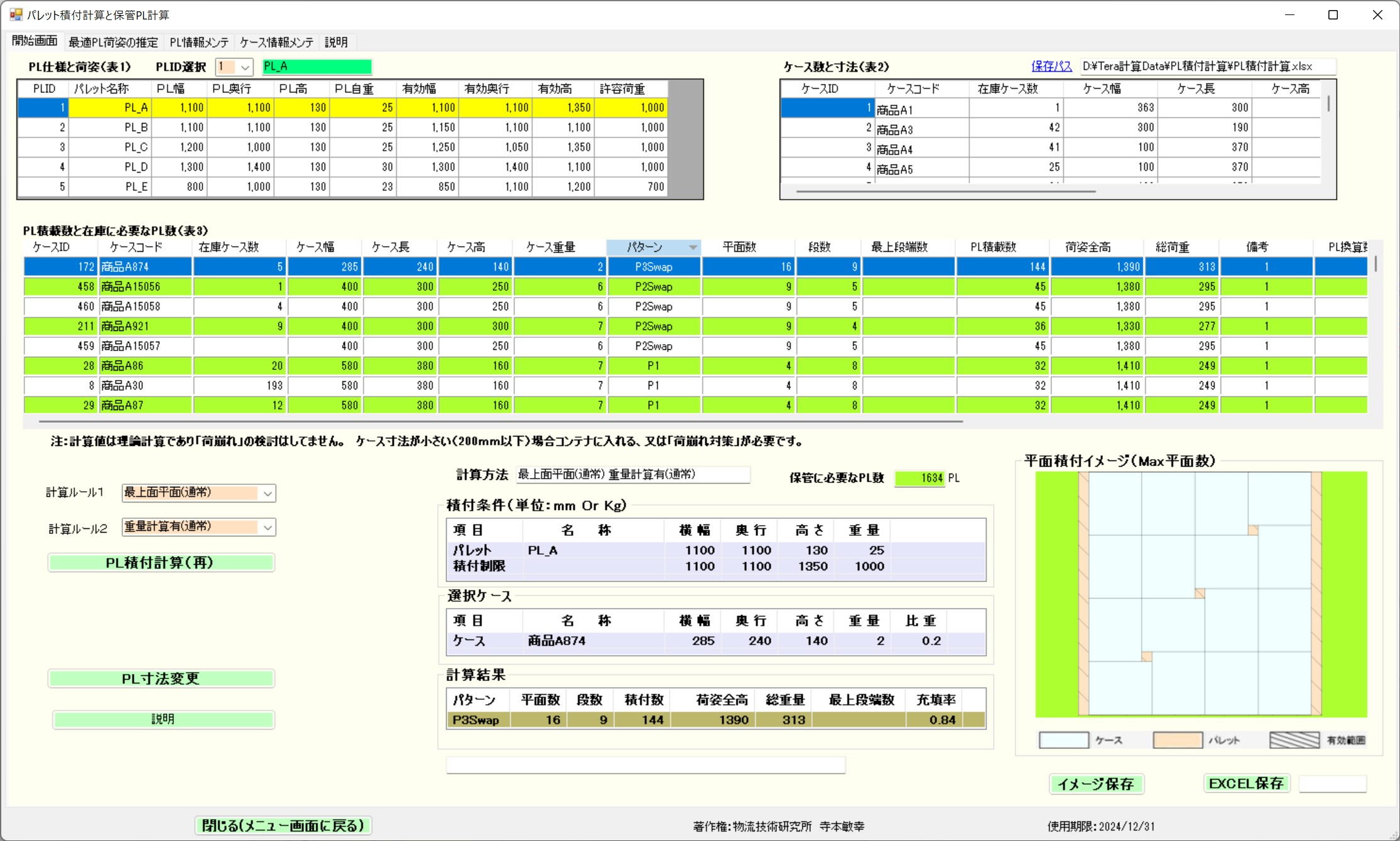
Clicking a record row in the table interacts to display a loading planar diagram.
Case Quantity and Dimensions
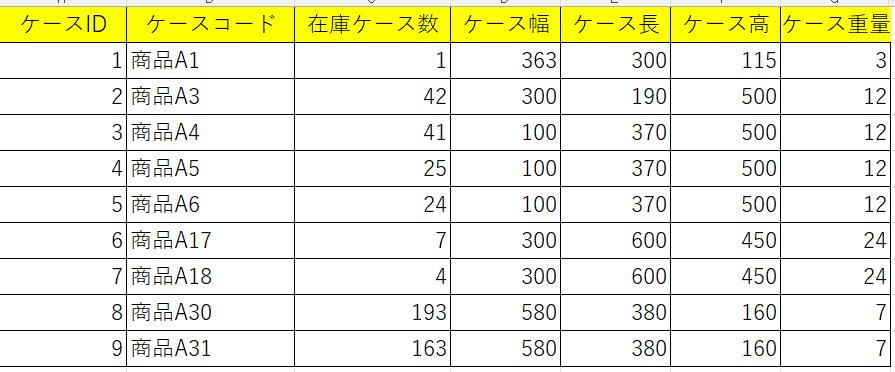
Calculates planar storage count from planar dimensions, and the number of stacked tiers from height.
Items that cannot be loaded onto PLs due to case dimensions and case weight are automatically discriminated and displayed as unloadable.
PL Specifications and Configuration
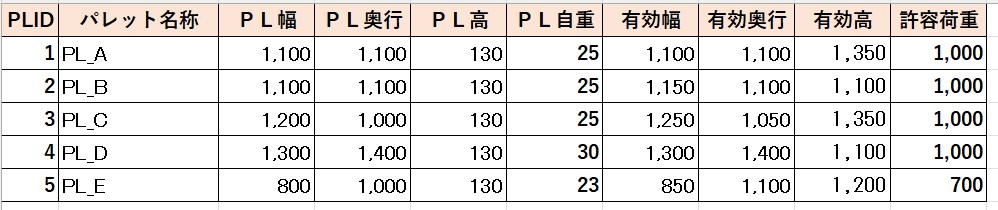
Specify the pallet from the left.
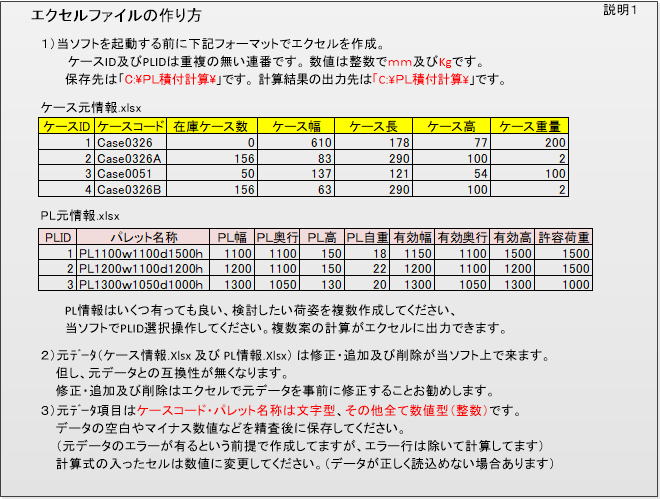
Excel Output
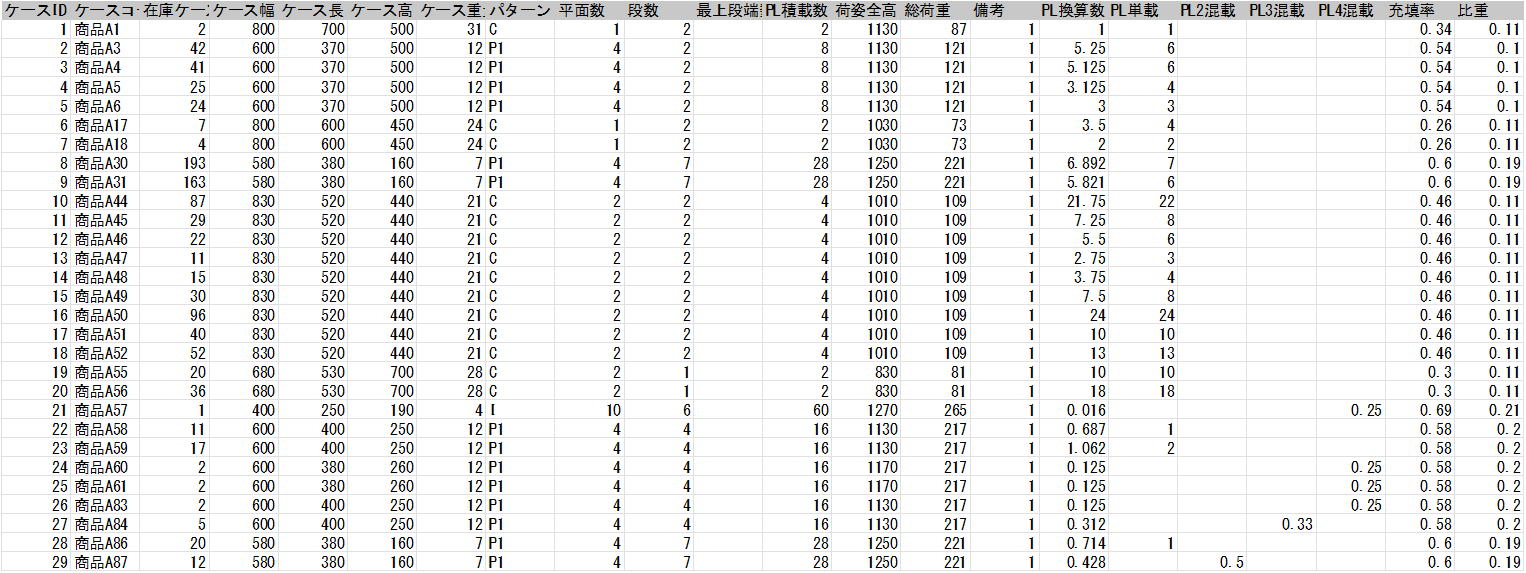
After calculation, output to Excel (Tera Calculation Data\PL Loading Calculation\PL Loading Calculation Result 4 Mixed 20250109-152656 Top Surface Planar (Normal) Weight Calculation Included (Normal)).
As an aggregation:
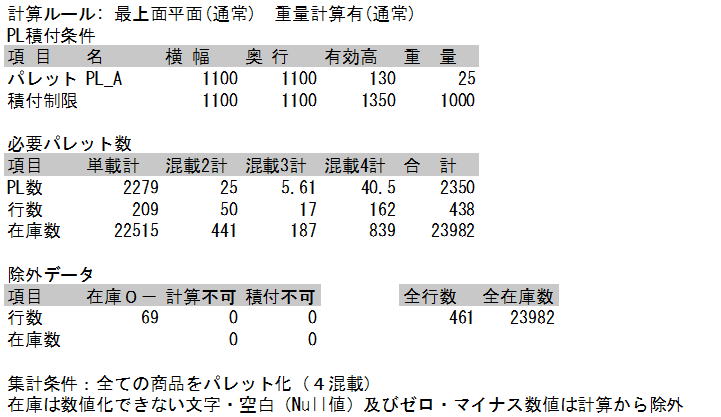
Calculated as rounded up single load for 0.5 PL or more
2 mixed load for less than 0.5 PL and 0.33 PL or more
3 mixed load for less than 0.33 PL and 0.25 PL or more
Calculated as 4 mixed load for less than 0.25 PL
Estimation of Optimal PL Configuration
This program is software that estimates how storage efficiency and area change according to various PL dimensions.
Section 5: Receiving Space
Overview of Receiving Space Calculation
This function is a tool that simulates the area of the temporary storage space (staging area) necessary for inspection and temporary holding based on scheduled receiving data.
Main Features and Operation
- Dynamic Loading Confirmation: When you click a data record on the screen, a planar diagram of the pallet load corresponding to that receiving volume is interactively displayed. This allows you to evaluate the space while visually grasping the actual configuration.
- Layout Optimization: It calculates how to arrange pallets against the receiving volume to secure an efficient workspace.
Utilization Scenes in Practice
A shortage of receiving space leads to increased vehicle waiting times and decreased work efficiency. Using this tool makes the following evaluations possible.
- Forecasting Space Demand by Time Slot: Calculation of the maximum area required during times when receiving is concentrated.
- Placement Planning Considering Aisle Widths: Layout design that ensures smooth flow lines for forklift driving paths and inspection workers.
- Evaluating Pallet Stacking Tiers: Simulation of floor space savings through stacking tiers that consider the characteristics of the products and the risk of load collapse.
Calculation Screen
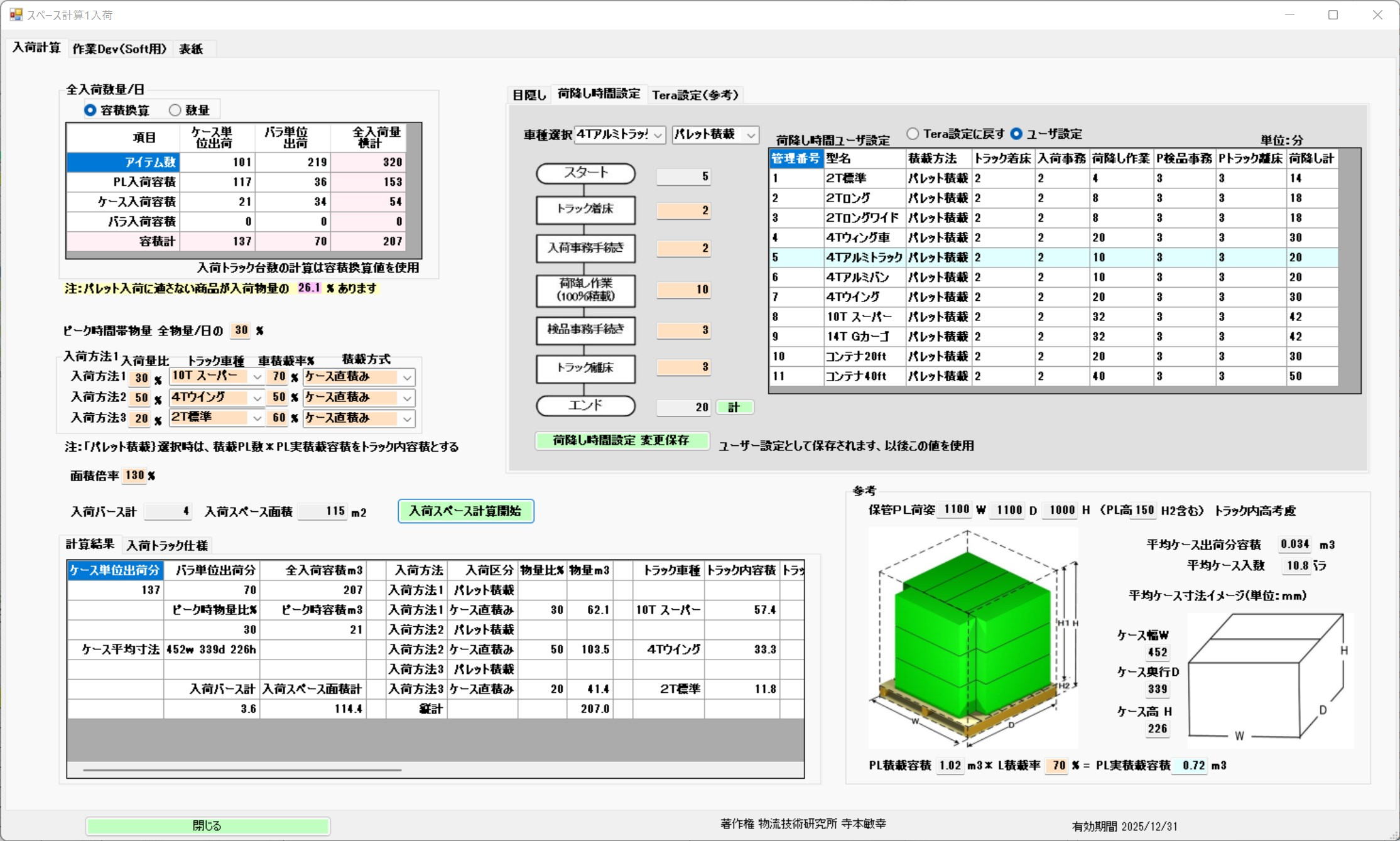
Clicking a record row in the table interacts to display a loading planar diagram.
Section 6: Shipping Packed Volume
Overview of Shipping Packed Volume
This function is a tool that simulates the total volume (volume and weight) after packing based on scheduled shipping data. It calculates numerical values that are indispensable for arranging delivery vehicles and securing space in the shipping waiting area.
Main Features and Operation
- Visual Loading Confirmation: By clicking a data record (table row) on the screen, a loading planar diagram corresponding to that shipping content is interactively displayed in real-time.
- Grasping Configuration: Because you can check the planar diagram based on the actual packing format, it is possible to grasp in advance the image of loading onto trucks and how pallets should be arranged.
Utilization Scenes in Practice
Accurately predicting shipping packed volumes enables various optimizations in the logistics workplace.
- Optimization of Dispatch Planning: By calculating the total volume after packing in advance, you can maximize the vehicle's load factor and reduce excess chartered vehicle costs.
- Management of Shipping Staging Area: Predicts how much space is needed to place completed packed cargo, allowing you to plan a layout that does not hinder operational flow.
- Appropriate Placement of Work Personnel: By grasping the number of pieces and weight after packing, you can accurately estimate the number of staff required for inspection and loading work.
Calculation Screen
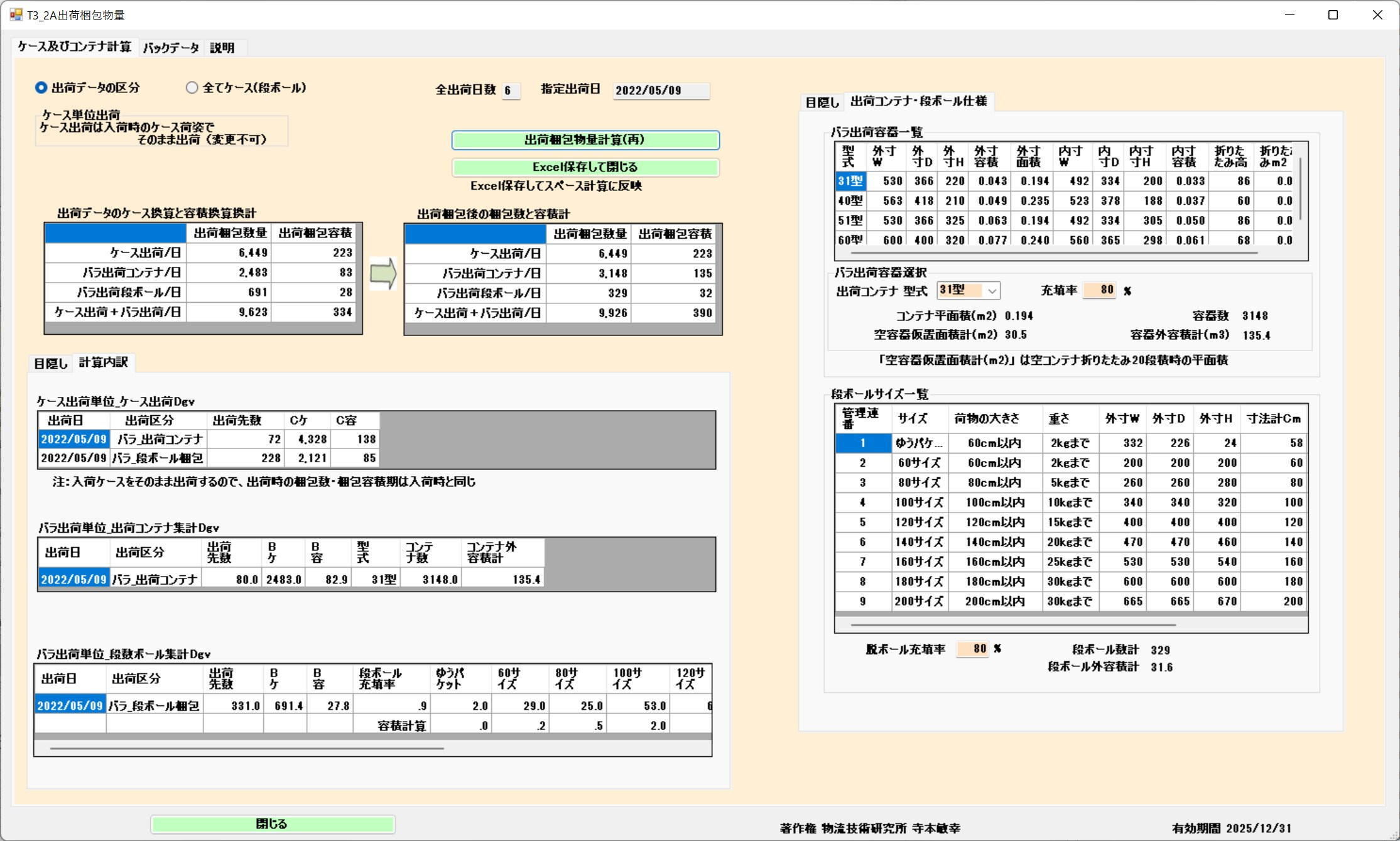
Clicking a record row in the table interacts to display a loading planar diagram.
Section 7: Shipping Space
Overview of Shipping Space Calculation
This function is a simulation tool for calculating the optimal area for the shipping staging area (temporary storage space) based on the amount of cargo waiting to be shipped.
Main Features and Operation
- Dynamic Layout Confirmation: Clicking a record row in the table on the calculation screen interactively displays a loading planar diagram corresponding to that shipping data.
- Visual Space Grasping: By checking the planar diagram, you can concretely grasp the extent and placement image of the area occupied by pallets in the actual shipping area.
Benefits of Utilization in Practice
Accurately calculating shipping space prevents stagnation in shipping operations and improves the turnover rate of the entire center.
- Resolution of Space Shortages: By forecasting volume during peak shipping times, you can proactively avoid the risk of overflowing cargo blocking operational flow lines.
- Efficiency in Dispatch and Loading: By visualizing cargo volumes per destination or trip, an efficient temporary placement plan can be devised in sequence with the truck loading order.
- Improvement of Safety: Designing space while securing appropriate aisle widths leads to the prevention of collision accidents between forklifts and workers.
Calculation Screen
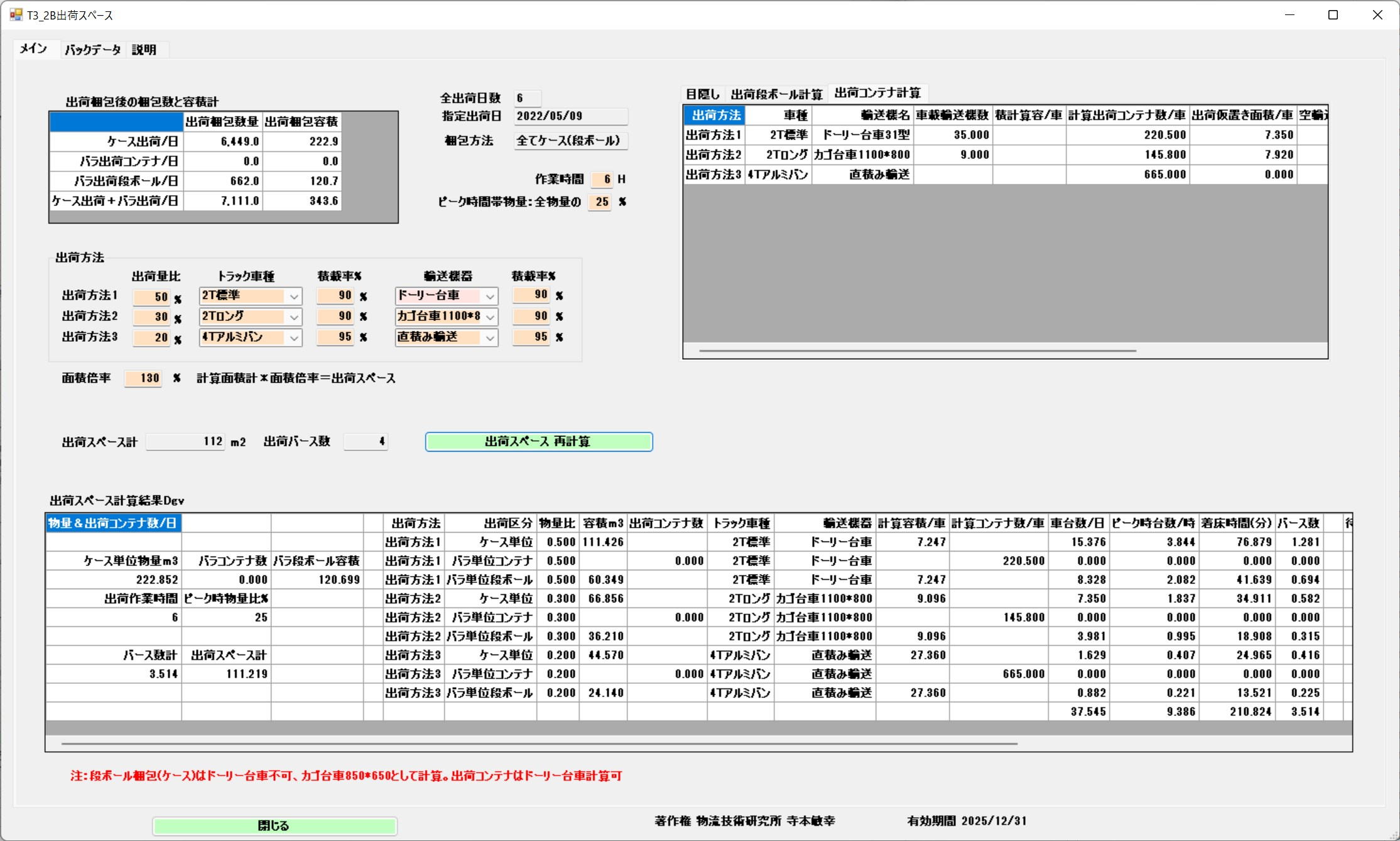
Clicking a record row in the table interacts to display a loading planar diagram.